Hello everyone!
I’ve got another TSU update for you! A couple of small changes and one big addition. Let’s start with the big one.
TSU AI
Topic Title Generation
Users can now get AI-generated title suggestions for scam-number posts! Post titles have always been an issue for TSU; it can be hard to get everyone to follow the guidelines. 
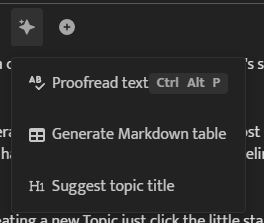
When creating a new topic, just click the little star. A dropdown menu will appear with a few options:
-
Proofread Text: Scan your post for misspellings, grammar issues, and other improvements.
-
Generate Markdown Table: Create a nicely formatted table to organize information in your post.
-
Suggest Topic Title: Analyze your post and suggest a title, formatting any phone number according to the TSU scammer posting guidelines.
Example:
TSU AI Helper
Next is the TSU AI Helper, a bot that can answer questions about scambaiting, recognizing scams, reporting scammers, and finding help if you’ve been scammed!
You can access it from the left sidebar, just above CATEGORIES.
- Example:

This bot is meant for people who just need a question answered. Whether you’re interested in getting started with scambaiting or wondering something like, “How does phone number spoofing work?”, the helper can point you in the right direction.
This is for everyone! Whether you’re a scambaiter or just want to learn more and stay alert to scams.
Your data
The LLM service used to process requests is Ollama Cloud (Not Sponsored). This is a privacy respecting service that hosts open source AI models.
So, no data being sent to OpenAI, Anthropic, etc. You can read the Ollama privacy policy here: Privacy Policy
“When using cloud-hosted models, we process your prompts and responses transiently to provide the service and never train on it. We collect basic account info and limited usage metadata that does not include prompt or response content. We don’t sell your data.”
With this in mind, don’t send personal info the the AI you dummy! Just ask it about scammer crap, fix your titles, and be happy. 
Usage
Here are the usage limits per user trust level:
- trust level 0: 15 max uses per 6 hours.
- trust level 1: 25 max uses per 6 hours.
- trust level 2: 35 max uses per 6 hours.
Please keep these limits in mind when using the system. Any abuse will lead to an account/ip ban.
Other Changes
Alongside the AI features, I’ve made a few smaller updates:
-
Changed the header and body fonts site-wide
-
Updated the default dark theme
-
Disabled the outdated light theme
-
Updated topic box styling
-
Removed outdated theme components
-
Fixed TSUBot not sending a welcome message on signup
The biggest visual changes you’ll notice are the fonts and category styles.